My First iOS App Is Live: QuickTimeLapse
To squeeze my daily workout videos into Instagram's one-minute Story limit, I vibe-coded my first iOS app. It does exactly one thing: turn any video into a one-minute time-lapse.
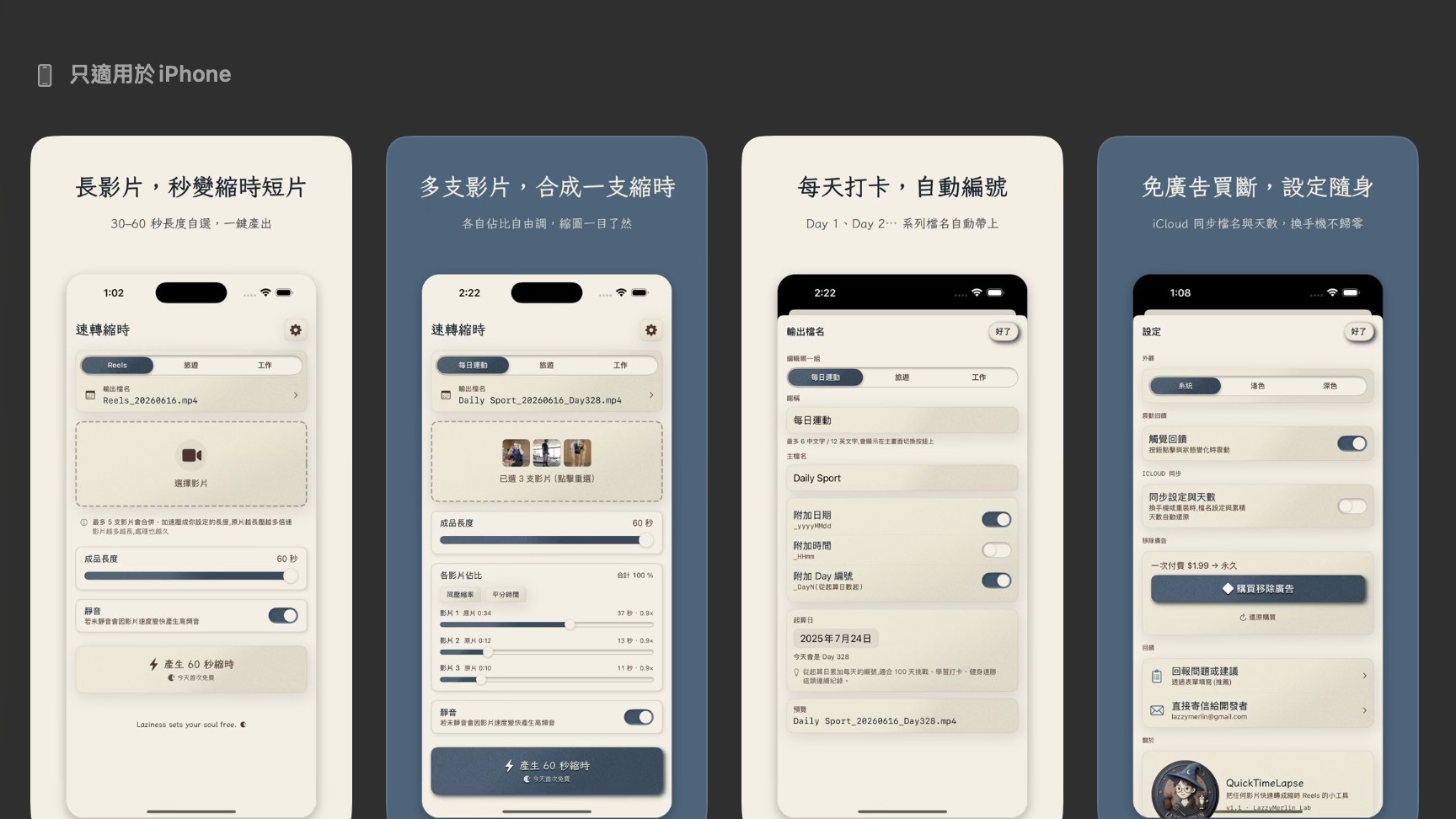
My very first iOS app is finally live on the App Store 🎉
It's called QuickTimeLapse, and it does one very simple thing: turn a video into a one-minute time-lapse.
I built it to solve a small daily annoyance of my own.
I film myself working out every day. Since Instagram Stories cap out at one minute, the only way to post the footage as a workout log is to turn it into a time-lapse. It's the little constraint that keeps my exercise habit alive.
Sounds simple, but here's what my old workflow looked like:
After working out, I'd AirDrop a 20-, 30-, sometimes 40-minute video file to my laptop, open iMovie, compress it down to one minute, then AirDrop it back to my phone before I could post. All that back-and-forth file transfer, plus the compression time — and AirDrop would sometimes just fail — meant at least an extra 20 to 30 minutes every single day.
I did this every day, for over three hundred days straight.
But the video was shot on my phone in the first place. Needing a whole separate laptop just to finish the job, shuffling files back and forth, with huge video files eating up space on the laptop — it all felt ridiculous. I searched the App Store and couldn't find a simple time-lapse app that wasn't either missing or behind a paywall.
So I thought: fine, I'll just make one myself.
The whole app was built with pure vibe coding. I describe what I need to the AI, it writes the code, and I test it. Now I can turn a video into a time-lapse right on my phone in just over a minute, and post straight to Instagram. It genuinely saves me a ton of time and hassle.
Later I added a day-counter feature too. I used to have to scroll back to yesterday's Story just to figure out what day I was on; now the app counts for me, so I won't lose track.
I'll admit I'm a bit obsessive about design. Building several products at once, the thought of each app looking completely different drove me a little nuts. So I built a design style I actually like — the warm tones and textures I call "Lazzy Merlin Lab" (the studio brand name my wife and I came up with together) — and I'll apply it to everything I make from now on. Partly to save effort, so I don't reinvent a look for every app; partly so that, product by product, I slowly iterate my own brand design system — and my AI learns it too, automatically applying it every time I start something new.
With AI, building the app itself really isn't hard. It's just constant back-and-forth with the AI, then testing. Testing takes the most time, but this app is simple, and since I work out every day anyway, I got to test it for a good while. It's been pretty stable and handy.
One thing I was especially careful about: privacy. Apple is famously strict about user privacy, so while building, I had the AI triple-check that the app doesn't step on any privacy landmines, keeping permission requests to an absolute minimum. I also kept asking it to run security reviews to make sure the whole thing is safe. There are public skills you can grab off the shelf for this kind of security scan now, and the stronger AI models are genuinely good at it — so on that front, I think we're in good shape.
The truly painful part was the App Store submission itself. So much paperwork to fill out, plus a pile of legal details to watch for — all completely new to me.
But AI makes it so much easier these days. When I couldn't figure out a form, or hit an error I didn't understand, I'd just screenshot it and paste it to the AI, and it could basically tell me what to do and what to fill in next.
In the end, it really just comes down to patience. Take it one step at a time, and I think anyone can get through it.
One last little plug. If you also need to turn long videos into time-lapses (like me, squeezing them into Instagram's one-minute Story limit), give it a try.
https://apps.apple.com/tw/app/quicktimelapse/id6771675804
It does something genuinely simple — but it solves a problem I had every single day.
And that's why I made it.
#QuickTimeLapse #Solopreneur #VibeCoding #MyFirstApp #TimeLapse