QuickTimeLapse v1.1: Choose Your Length, Split Your Clips
Two features I only thought of after launch: set the final length anywhere from 30 to 60 seconds, and decide how much of the result each clip takes up. I also gave the app a Chinese name.
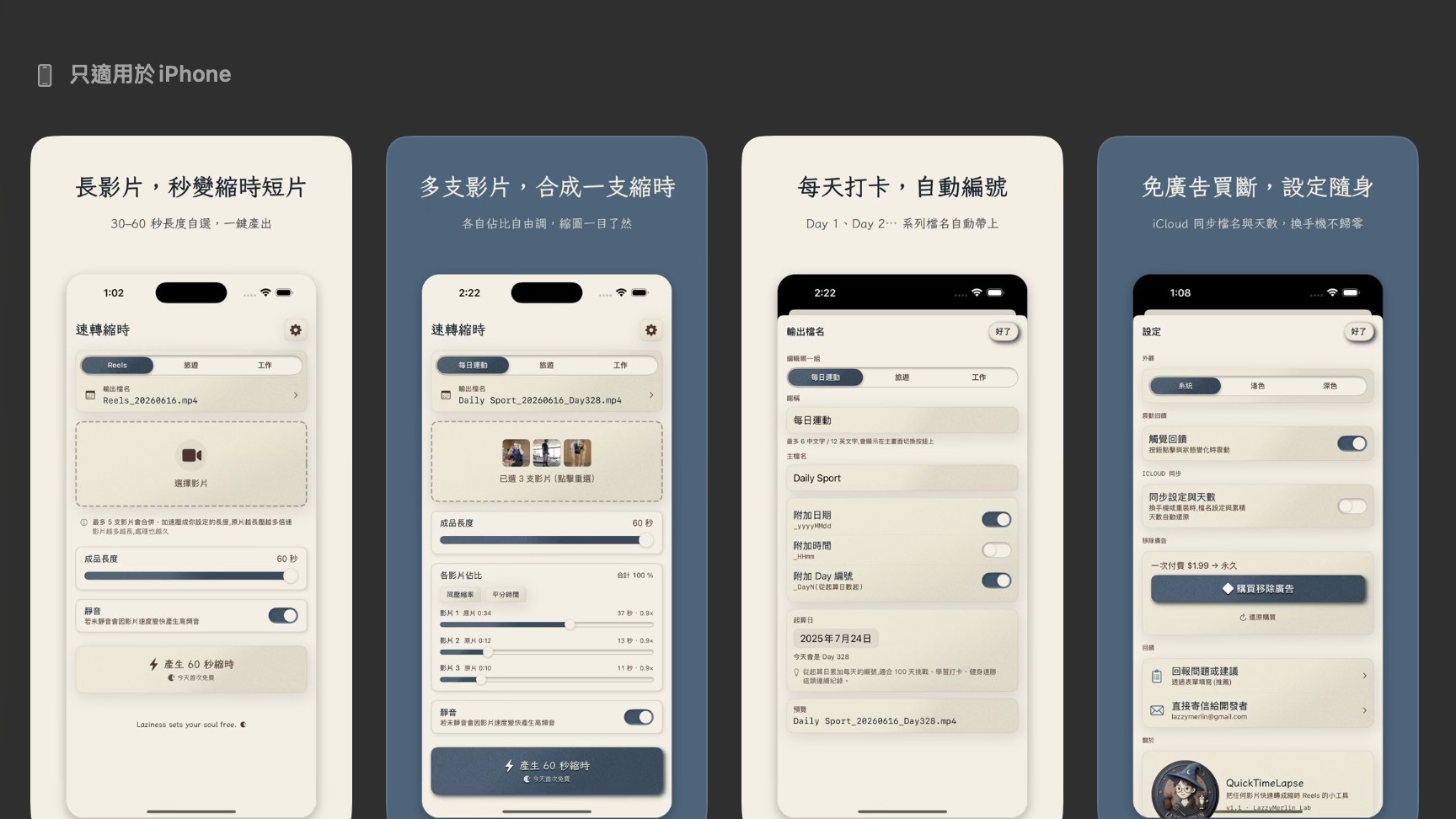
QuickTimeLapse got its v1.1 update today — and I gave it a Chinese name while I was at it: 速轉縮時 (literally "quickly turn into time-lapse" — about as on-the-nose as it gets, lol).
The two things I added this time are features I only thought of after shipping the first version: you can now choose the final length yourself, and you can decide how much of the result each clip takes up.
First: you finally get to decide the length.
In QTL v1.0, I hard-locked the final length at one minute. My own need was rigid — Instagram Stories only allow one minute, not a second more, and every day after working out I just wanted to compress my footage into exactly one minute for a Story.
But after launch, it hit me that maybe not everyone's needs are as rigid as mine. Some people feel 30 seconds is snappier and don't want to fill the whole minute. So in this version, I made the length adjustable anywhere from 30 to 60 seconds — a little breathing room.
This actually answers a question someone asked me on Threads at launch: "Why not just shoot with the iPhone's built-in time-lapse?"
Because built-in time-lapse locks the compression ratio, not the length. With the iPhone's built-in time-lapse, the longer you shoot, the longer the result — there's no way to guarantee it lands on an exact number of seconds. QTL locks the length; and this version lets you control that length yourself.
Second: the per-clip proportions.
QTL lets you combine up to five clips into one time-lapse. But until now, how much time each clip took up in the result was decided automatically by the app, based on each clip's original duration. Starting with this version, you split it yourself. The clip that matters most gets more time; the one that's just a transition can flash by. It makes the final result a lot more flexible.
There's actually an even more critical thing the built-in version can't do: you have to decide on a time-lapse before you hit record. (You can still adjust the time-lapse ratio after shooting, sure — but in my case, I usually only think of compressing a clip right before posting.) QTL has lived in the "after you shoot" world since v1.0: pick a video straight from your library, compress, post. Simpler and more intuitive.
So whether it's the new adjustable length, the per-clip proportions, or the "time-lapse after the fact" the app has done since day one — it all comes down to the same thing: handing the time-lapse decision back to you, instead of leaving it to the camera's defaults.
QuickTimeLapse is now updated to v1.1 — give it a download or update and try it out. If you're already using it, update and these two new features are yours.
https://apps.apple.com/tw/app/quicktimelapse/id6771675804
#QuickTimeLapse #Solopreneur #TimeLapse #BuildInPublic #MakingProducts